



Why Choose Audio Headphones for Your Business?

Why Choose Audio Headphones for Your Business?

A customer hears more than your words on a call. They hear the room, the keyboard, and the pause when a connection drops. The right audio headphones can make conversations clearer, help staff focus, and support a more consistent experience across an office or remote team. Small details matter: a comfortable headband during a long shift, a microphone that reduces nearby chatter, and controls employees can use without searching through menus.

Headphone researcher Dr. Sean Olive’s published work offers a useful principle: sound quality should be judged through listening evidence, not marketing labels alone. For businesses, that means testing audio headphones with real calls, in real workspaces, before placing a large order. Ask employees to wear them for a full meeting. Check whether voices sound natural and whether the microphone catches the speaker clearly. Then review durability, device compatibility, replacement parts, and support. It is easy to focus on price. That can be a mistake.

No headset solves every problem. A noisy floor may need better room planning, too, and one model will not fit every employee equally well. The practical choice balances comfort, clear communication, dependable performance, and cost. A short pilot can reveal what a product sheet misses. Worth the effort.

Why Choose Audio Headphones for Your Business?

Define Business Headphones by Use Case, Fit, and Connectivity

Business headphones should be chosen for the work they support, not for a feature checklist. At a busy support desk, a boom microphone can keep speech clear over nearby conversations. In a quiet office, lighter headphones may be sufficient. For long shifts, pressure around the ears matters as much as sound quality. Small discomforts add up.

Fit is personal. Over-ear cups can feel less tiring for some employees, while others prefer lighter on-ear designs. Try a short wear test before ordering in bulk. The World Health Organization estimated in 2015 that 1.1 billion young people faced a risk of hearing loss from unsafe listening practices. Keep volume limits and listening breaks in mind, especially for staff wearing headphones for hours. A good fit does not guarantee safe listening.

Connectivity should match the workday. A wired USB connection can suit a fixed desk, while Bluetooth offers more freedom for mobile staff; check device compatibility and call controls either way. Pew Research Center’s 2023 survey found that 35% of workers with remote-capable jobs worked from home all the time, while 41% worked in a hybrid arrangement. That makes flexible setups useful, but not universal. The best choice may need revisiting as roles and workspaces change.

Match Microphones and ANC to Calls, Meetings, and Shared Offices

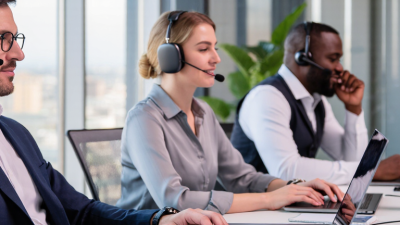
Business calls depend on clear speech, not just loud playback. A boom microphone positioned near the corner of the mouth can capture a steady voice while reducing keyboard clicks. For frequent calls, check that the mic stays in place when you turn your head. During a trial, record a short call from your usual desk and listen for muffling, room echo, and clipped words. Small details matter. A built-in mic may suit quick check-ins, but longer client conversations often benefit from closer mic placement.

ANC helps employees hear voices and meeting audio over fans, ventilation, and nearby conversations. It does not automatically clean up the sound sent to others; microphone noise reduction is a separate feature. This distinction is easy to miss. In a shared office, strong ANC can make a headset feel isolating, while lighter cancellation may keep coworkers’ voices audible. Consider adjustable ANC, comfortable earcups, and a quick way to mute the mic. Test the headset in the actual workspace, not only in a quiet room. There is no perfect setting: a fan’s hum may fade, yet a nearby voice can still break through.

Apply NIOSH’s 85 dBA, 8-Hour Limit When Reviewing Hearing Exposure

Audio headphones can support calls, training, and focused work, but convenience should not obscure hearing exposure. NIOSH recommends limiting occupational noise to an average of 85 dBA over an eight-hour workday. The limit is cumulative, not a safe setting for every device. Under NIOSH’s 3 dB exchange rate, each 3 dB increase halves the recommended exposure time.

When reviewing headphone use, consider the full workday: listening volume, nearby machinery, meetings, and time spent wearing the headset. A quiet office call differs from a warehouse shift beside a running conveyor. Measure sound where employees actually listen, using calibrated equipment or a qualified hearing-conservation professional. Phone volume indicators alone may not reflect sound levels at the ear. Keep records, and reassess when tasks or equipment change. Small details matter.

Choose headphones and work practices that make lower listening levels practical, such as clear speech and easy-to-use volume controls. Do not treat ordinary audio headphones as hearing protectors unless their protection claims and use are properly verified. Noise cancellation may help in some settings, but it does not replace exposure assessment. Employees may gradually raise volume without noticing. That deserves attention. A brief listening check can miss exposure accumulated across a long shift, and even a careful review has limits when work conditions vary.

Why Choose Audio Headphones for Your Business? - Apply NIOSH’s 85 dBA, 8-Hour Limit When Reviewing Hearing Exposure
Average Noise Level (dBA) NIOSH Recommended Maximum Daily Exposure Approximate NIOSH Dose at That Duration Practical Review for Business Headphone Use
85 dBA 8 hours 100% Use as the NIOSH recommended exposure limit reference point for a full workday.
88 dBA 4 hours 100% Account for time at this level alongside other workplace noise exposure.
91 dBA 2 hours 100% Review listening duration carefully; the recommended exposure time halves with each 3 dB increase.
94 dBA 1 hour 100% Consider lowering the listening level or limiting time at this exposure.
97 dBA 30 minutes 100% Do not treat short listening periods as risk-free; include them in the day's cumulative exposure.
100 dBA 15 minutes 100% Review whether the task or listening level can be changed to reduce exposure.
103 dBA 7.5 minutes 100% Very brief exposure can use a substantial portion of the recommended daily allowance.
How to interpret: These durations follow the NIOSH recommended exposure limit of 85 dBA for 8 hours with a 3 dB exchange rate. Daily noise dose is cumulative across relevant noise sources; for a single steady level, dose (%) is exposure time divided by the recommended duration at that level, multiplied by 100. Headphone volume settings do not directly establish sound level at the ear, so assess actual exposure using appropriate measurement methods. The NIOSH REL is occupational health guidance, not a guarantee of zero risk.

Source: NIOSH, Criteria for a Recommended Standard: Occupational Noise Exposure (1998), recommended exposure limit of 85 dBA as an 8-hour time-weighted average with a 3 dB exchange rate.

Compare Codecs: Bluetooth SIG Says LC3 Can Use 50% Lower Bitrate Than SBC

Business headphones are often judged by call clarity, comfort, and how long they last between charges. Codec choice also matters, especially in busy offices where many wireless devices share the air. Bluetooth SIG says LC3 can deliver comparable audio quality to SBC at about 50 percent lower bitrate. That is a meaningful efficiency claim, not a guarantee for every headset or listening condition.

A lower bitrate can reduce the amount of audio data sent each second. In practice, that may help a headset preserve battery life or maintain a steadier connection when an employee walks between meeting rooms. Small gains matter. Yet codec efficiency alone cannot fix a weak microphone, poor antenna design, or an unstable computer connection. Real performance depends on both connected devices supporting LC3 and on how manufacturers implement it.

For procurement teams, compare codecs alongside microphone tests, comfort, and call reliability. Try units in a real workspace: play speech, join a video call, then move past a partition. Listen for dropouts and ask users about fatigue after an hour. The advertised bitrate reduction is useful context, but it should not replace hands-on evaluation. Actual battery savings vary by product, and codec settings are not always visible to the buyer.

Why Choose Audio Codecs for Your Business?

Relative bitrate for comparable audio quality

The Bluetooth SIG reports that LC3 can deliver comparable audio quality at about 50% of SBC’s bitrate. The chart uses a normalized index (SBC = 100); actual bitrates vary by configuration and use case.

Plan Rollouts Around Compatibility, Support, and Total Cost of Ownership

A business headphone rollout should begin with the devices employees already use. Check operating systems, meeting applications, connection types, and microphone behavior before ordering at scale. Bluetooth SIG’s 2024 Market Update projects annual Bluetooth device shipments will reach 7.5 billion by 2028, up from 5 billion in 2023. That growth does not guarantee every headset will work smoothly with every laptop. Test a small sample across real desks, shared rooms, and mobile work. Small pilots matter. Ask users to join calls, switch devices, and wear headsets for a full shift.

Support needs planning, too. Keep spare units and ear cushions available, document pairing steps, and confirm warranty turnaround times. The 2023 Work Trend Index found that 68% of surveyed workers lacked enough uninterrupted focus time. Headphones may help, but poor fit or unclear microphone audio can create new friction. Total cost of ownership includes more than the purchase price: adapters, replacements, charging, help-desk time, and lost work during failures all count. Build a simple cost estimate over the expected service life. It will still miss something. Review it after the first month, when support tickets and actual replacement needs start to show where assumptions were wrong.

Our offices

Axtel Poland (HQ)
Mokotów Box 16 Woloska St
02-675 Warsaw Poland

tel. (+48 22) 490 96 00
fax: (+48 22) 540 15 22
sale@officeveigl.com

Axtel Middle East & Asia
G-026, THUB 2
Dubai Silicon Oasis
Dubai United Arab Emirates

tel. +971 50 5540 902
sale@officeveigl.com

Axtel India Private Limited
Unit # S-2, Srinivasa Apartments,
16, 1st Cross, Doctors Layout, Kasturinagar,
Bengaluru, Karnataka, India

tel. +91 96865 46376
sale@officeveigl.com

Axtel Benelux
Microlab Kastanjelaan 400
5616 LZ Eindhoven The Netherlands

+31 629 796 453
sale@officeveigl.com


