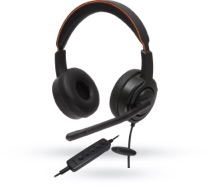
How to Choose the Best Office Headset with Mic?

An office headset with mic is not a small detail when your workday moves between calls, shared rooms, and focused tasks. Microsoft’s 2023 Work Trend Index found that 68% of surveyed workers lacked enough uninterrupted focus time, while 64% struggled to find the time and energy to do their work. These figures do not prove that a headset fixes workplace noise. They do show why clear, comfortable communication matters.

Sound consultant and author Julian Treasure offers a useful reminder: “The human voice: It’s the instrument we all play.” A headset should preserve that voice, not bury it under keyboard clicks or make it tiring to listen. Consider microphone noise handling, sidetone, and how naturally your voice comes through. Then check fit, weight, connection type, and compatibility with your meeting platform. Small details count. A clamp that feels fine for ten minutes may feel different after a full afternoon.

This guide explains how to choose an office headset with mic for your actual work, not just a product-page checklist. Compare wired and wireless models, test the microphone in a realistic room, and check return terms before buying. If possible, wear the headset through a typical meeting. The quiet test matters. So does the long one. No single model suits every head, desk, or call schedule; even strong specifications can disappoint in daily use. That is worth remembering.

How to Choose the Best Office Headset with Mic?

Identify Your Office Communication Needs

Before choosing an office headset with mic, map how conversations actually happen during a workday. A receptionist handling walk-ins needs a microphone that keeps nearby voices and desk noise from overwhelming callers. A remote analyst may care more about comfort during long video meetings and clear speech in a quiet room. Note your typical call length, daily call count, and whether you move between desks. Small details matter.

Then identify the environment at both ends of each call. In an open office, check whether colleagues’ nearby conversations reach the caller. Microphone noise reduction can help, but it does not create a silent workspace. If you often stand or walk, confirm that the cable or wireless range suits your desk layout. For private discussions, consider who can hear the headset’s audio and whether a single-ear or two-ear design fits your work. That choice may seem obvious until a busy afternoon. Ask colleagues who share your workspace what they notice, then verify comfort and microphone clarity with a short trial call.

Compare Headset Designs and Connection Types

Choosing a headset starts with how it sits during a full workday. On-ear models are lighter and easier to remove, but their pressure can become noticeable after several hours. Over-ear cups often reduce nearby office noise, though they may feel warm in a small room. A single-ear design keeps one ear free for colleagues; stereo cups can make voices easier to follow in a busy workspace. Fit is personal. Try moving your head and speaking at normal volume before deciding. A flexible boom microphone usually stays closer to your mouth than an inline mic, which can rub against clothing or pick up keyboard taps.

Connection type affects reliability as much as comfort. USB-A and USB-C headsets usually offer a direct computer connection, but check the ports on your work devices. A 3.5 mm plug can work across laptops and phones, although some computers combine headphone and microphone inputs differently. Bluetooth is convenient when moving between desks, yet walls and crowded wireless environments can interrupt audio. A dedicated wireless receiver may provide steadier computer calls, but it adds another small item to carry and charge. I would test the mic in the actual meeting app, not just a device’s sound settings. That detail is easy to overlook. A headset can sound clear in a quiet room and still capture a nearby printer or a colleague’s voice.

Evaluate Microphone and Audio Performance

A headset microphone should make your voice clear without requiring you to lean toward it. Test it during a normal call, not only in a quiet room. Speak at your usual distance, then move slightly back and turn your head. Ask a colleague whether your words remain easy to understand. Listen closely. A quick voice memo can also reveal muffled speech, sharp “s” sounds, or uneven volume.

In a shared office, check how much keyboard noise and nearby conversation reach the other end. A directional microphone may reduce sounds from the sides, but placement still matters. Adjust the boom near the corner of your mouth, rather than directly in front of it, to reduce breath noise. Try the same test beside a working keyboard. One quiet-room test is not enough.

Audio performance matters for both calls and focused listening. Play a spoken recording at a comfortable volume and notice whether voices sound natural or thin. Then try a longer meeting: harsh treble or weak speech clarity can become tiring over time. Music can help you judge balance, but it should not replace a call test. If possible, compare recordings at equal volume; louder audio can seem clearer even when it is not. Your own voice may sound odd in a recording, too, so ask someone who hears it from the other end.

How to Choose the Best Office Headset with Mic? — Evaluate Microphone and Audio Performance
Evaluation Dimension What to Look For How to Evaluate It Why It Matters
Microphone voice clarity Speech should sound clear and natural, with words easy to understand and no obvious muffling or harshness. Record a short call-style sample and listen on another device. Compare it in a quiet room and during normal office activity. Clear speech reduces repetition and helps callers follow conversations.
Background-noise handling Check how well the microphone limits keyboard sounds, nearby conversation, and steady office noise without making speech sound choppy. Test with a consistent background sound while speaking at a normal volume. Listen for both noise reduction and speech artifacts. Noise processing varies by headset and software; product descriptions alone do not establish real-world performance.
Microphone placement and pickup A boom microphone that can be positioned close to the mouth is often easier to place consistently. Check that it stays in position during use. Adjust the microphone as instructed, then speak at a normal level. Check whether small head movements noticeably change voice level. Placement and pickup pattern affect how much speech and surrounding sound the microphone captures.
Microphone frequency response Review the published microphone response if available, but do not treat a wider stated range as proof of better speech quality. Use a voice recording or call test. Prioritize intelligibility and natural tone over a specification-sheet range alone. Frequency-response figures describe measured frequency coverage, not the complete quality of a microphone.
Incoming audio clarity Speech should be intelligible at a comfortable listening level, without distortion, rattling, or distracting tonal changes. Listen to a voice recording and a meeting call at your usual volume. Check both speech and any audio you regularly use for work. Comfortable, clear playback supports long calls and helps prevent listening fatigue.
Frequency-response claims for speakers Consider published response figures as one reference point, not a standalone quality score. A broad range does not guarantee balanced or clear sound. Listen to spoken content and familiar audio. Check for overly sharp high frequencies, boomy low frequencies, or unclear voices. Fit, tuning, seal, and listening level also affect how headset audio is perceived.
Echo and feedback control Look for effective echo control when using the headset in calls, especially if sound can leak from the earcups. Join a test call and ask another participant whether they hear their own voice returning or other echo. Echo can make conversations difficult even when the microphone itself sounds clear.
Sid​​etone (microphone monitoring) If available, check whether microphone monitoring lets you hear your own voice at a comfortable level. Speak during a call or microphone test and adjust the monitoring level if the feature is supported. Some users find sidetone helps them avoid speaking too loudly, but preferences differ.
Connection and call compatibility Confirm that the connection type and call controls work with your computer, phone, and intended meeting software. Test microphone input, speaker output, mute, and call controls on the devices and applications you use. Audio performance can be affected by device settings, connection method, and software compatibility.
Comfort during extended calls Check headset weight, clamping pressure, earcup fit, headband adjustment, and heat buildup. Wear it for a realistic work session and note pressure points, warmth, and whether the fit shifts. Comfort affects how consistently you can use the headset throughout the workday.
Overall decision Prioritize clear outgoing speech, comfortable incoming audio, reliable call controls, and a fit suitable for your workday. Compare shortlisted headsets using the same room, device, call application, speaking distance, and listening level. A consistent practical test is more useful than choosing by a single specification or feature label.

Assess Comfort, Compatibility, and Durability

How to Choose the Best Office Headset with Mic?

Comfort becomes clear after an hour, not during a quick try-on. Choose an adjustable headband that spreads pressure across your head, with ear cushions that do not press hard against your glasses. If possible, wear the headset for a full meeting before deciding. Small details matter. A light model can still feel tiring if its clamping force is too strong, and plush padding may become warm in a stuffy room. Comfort is personal, so a popular fit is not automatically the right fit for you.

Check compatibility with the devices and meeting tools you actually use. Confirm the connection type, microphone input, and mute controls work with your computer or phone. A short test call can reveal a quiet mic, awkward cable reach, or controls that are easy to bump. Durability deserves the same practical attention. Flex the headband gently, inspect the cable joins, and look for replaceable cushions if you expect daily use. Avoid assuming that a heavy headset is sturdier; weight alone proves little. One trade-off is hard to avoid: a compact design may travel well but offer less cushioning. Decide which inconvenience you can live with, then test that choice during a real workday.

Test Key Features and Choose the Best Fit

Choose a headset by testing it during the work you actually do. Make a short call beside a keyboard, then repeat it near an air conditioner. Ask a colleague whether your voice sounds clear and natural. A quiet showroom test can mislead; office hum changes everything. Check whether the microphone boom stays in place when you turn your head, and whether the ear cushions feel warm after an hour. Small details matter.

Test comfort, call clarity, controls, and connection stability—not just the feature list. Mute yourself, adjust the volume, and reconnect after briefly moving out of range. Try both ears if the design allows it. One-sided audio can feel convenient, but it may make long calls tiring. I would retest after a few days; first impressions are imperfect.

For listening safety, NIOSH’s Criteria for a Recommended Standard: Occupational Noise Exposure recommends limiting workplace exposure to 85 dBA over eight hours, with exposure time halved for each 3 dB increase. This is an occupational exposure recommendation, not a headset rating. Keep playback comfortable and lower it in quiet rooms. OSHA’s occupational noise standard also uses 85 dBA over eight hours as an action level. Use these figures as context, not a substitute for checking actual listening levels.

How to Choose an Office Headset: Compare Voice Bandwidth

A headset’s microphone should capture speech clearly across the frequencies your calls use. Compare these reference ranges when testing voice quality; bandwidth alone does not measure noise rejection, comfort, or overall sound quality.

Reference ranges: ITU-T G.711 (approximately 300–3,400 Hz); ITU-T G.722 (50–7,000 Hz); typical human hearing (approximately 20–20,000 Hz). Hearing range varies by person.

Our offices

Axtel Poland (HQ)
Mokotów Box 16 Woloska St
02-675 Warsaw Poland

tel. (+48 22) 490 96 00
fax: (+48 22) 540 15 22
sale@officeveigl.com

Axtel Middle East & Asia
G-026, THUB 2
Dubai Silicon Oasis
Dubai United Arab Emirates

tel. +971 50 5540 902
sale@officeveigl.com

Axtel India Private Limited
Unit # S-2, Srinivasa Apartments,
16, 1st Cross, Doctors Layout, Kasturinagar,
Bengaluru, Karnataka, India

tel. +91 96865 46376
sale@officeveigl.com

Axtel Benelux
Microlab Kastanjelaan 400
5616 LZ Eindhoven The Netherlands

+31 629 796 453
sale@officeveigl.com