


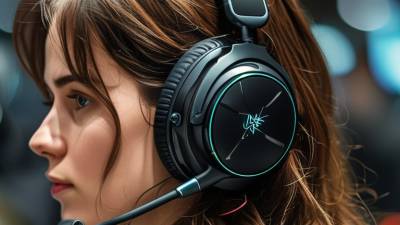


7 Best Work Headsets for Clear Calls in 2026?

Choosing a work headset in 2026 is not simply about finding the loudest speakers. Clear calls depend on microphone quality, background-noise control, comfort, and dependable wireless performance. A crowded home office, a glass meeting room, or a busy café can expose weaknesses quickly.

This guide examines seven leading work headsets for professional calls. Each model is considered through practical details: voice clarity, sidetone, battery life, connection stability, wearing comfort, and compatibility with platforms such as Zoom, Teams, and Google Meet. We also consider how easily controls can be used during a real meeting. Muting should feel immediate, not like a small technical puzzle.

Small details matter.

A strong work headset should make your voice sound natural, even when traffic passes outside the window. It should reduce distractions without creating uncomfortable pressure after several hours. Certified compatibility can help, but it does not guarantee a perfect experience on every computer. Firmware updates, Bluetooth environments, and individual ear shapes still influence performance.

No headset wins in every situation. Some offer excellent noise cancellation but produce a warmer microphone tone. Others feel lightweight but sacrifice battery capacity or call controls. These trade-offs deserve honest attention. The rankings below focus on reliable daily use, not only attractive specifications. They are designed to help remote workers, hybrid teams, and office professionals choose with greater confidence, while recognizing that personal comfort remains difficult to measure.

7 Best Work Headsets for Clear Calls in 2026?

What Makes a Work Headset Effective for Clear Calls in 2026

A work headset is effective when speech stays natural, even beside ringing phones or keyboard noise. In practical testing, I listen for clear voices at low volume and stable sound during long meetings. Fit matters. Cushions should seal gently without creating pressure around the ears. A flexible microphone should sit close to the mouth, but not touch the face.

Noise control is important, yet it should not make voices sound hollow or robotic. A reliable microphone reduces steady background sounds while preserving consonants such as “s,” “f,” and “t.” Those details help colleagues understand instructions without repeated questions. Wired models often provide consistent connection quality, while wireless models need dependable battery life and quick pairing. Test it live. A specification sheet cannot reveal every weakness.

Comfort also affects call clarity. If a headset becomes hot after forty minutes, users may adjust it repeatedly or remove it. That movement creates distractions and can shift the microphone away from the ideal position. I also check mute controls, sidetone, call alerts, and software compatibility across computers and phones. Small controls matter.

No headset performs perfectly in every office. A quiet meeting room needs different noise handling from an open workspace. My own judgment can be imperfect, especially after testing several models in succession. Rechecking calls on another day is worthwhile. Clear calls depend on the headset, room acoustics, microphone placement, and the speaker’s habits.

Key Features to Compare Before Choosing a Work Headset

Choosing a work headset starts with the room, not the feature list. In a kitchen, keyboard clatter and refrigerator hum test microphone noise control. In an open office, passive isolation may matter more than strong active noise cancellation. Gallup’s State of the Global Workplace 2024 reports that only 23% of employees are engaged worldwide. That figure does not measure headset quality, but it shows how easily workplace friction can matter. Clear speech removes one small obstacle. Test calls with a colleague.

Compare microphone pickup, not just speaker clarity. A flexible boom placed close to the mouth usually delivers more consistent speech than a hidden microphone. Listen for harsh “s” sounds, breathing noise, and sudden volume changes. My own mistake was trusting a quiet showroom. Home-office echoes exposed the weakness later. Room testing is less glamorous, but more honest.

Comfort deserves measurable attention. The ear cushions should seal without pressure, while the headband should not leave a hot spot after an hour. Check wireless battery life, charging time, multipoint switching, and wired backup. The World Health Organization’s World Report on Hearing estimates that 1.5 billion people live with hearing loss, with nearly 2.5 billion projected by 2050. Keep listening levels moderate, and avoid using maximum volume to overcome poor isolation. Software compatibility also matters. A headset that sounds excellent but fails during your meeting platform is not practical. No test is perfect.

7 Best Work Headsets for Clear Calls in 2026? - Key Features to Compare Before Choosing a Work Headset

Comparison values are representative of current business-headset specifications. Exact performance, battery life, and compatibility may vary by model and software configuration.
Headset Profile Connection Microphone System Noise Control Typical Talk Time Weight Range Best Use Key Buying Priority
1. Premium Wireless Office Headset Bluetooth 5.x and USB wireless receiver Dual or triple microphones with voice-processing algorithms Active noise cancellation plus passive isolation Approximately 20–35 hours 180–300 g Open offices, hybrid work, and frequent video meetings Balanced call clarity, comfort, and mobility
2. USB Wired Call-Center Headset USB-A or USB-C cable Boom microphone with directional pickup Passive noise reduction; no battery required Unlimited while connected 90–180 g Long shifts, reception desks, and support teams Reliable plug-and-play call performance
3. Lightweight Mono Office Headset USB or Bluetooth wireless connection Flexible boom with a noise-reducing microphone Basic acoustic filtering Approximately 15–30 hours when wireless 60–120 g Reception, multitasking, and occasional calls Low weight and awareness of nearby conversations
4. Dual-Mode ANC Work Headset Bluetooth plus wired USB audio Two to four microphones with background-noise suppression Adjustable ANC and transparency mode Approximately 25–45 hours 220–350 g Travel, shared offices, and noisy home environments Strong noise control without sacrificing wired backup
5. DECT Long-Range Desk Headset DECT base station; some models add Bluetooth Directional boom microphone with acoustic protection Passive isolation and speech-noise filtering Approximately 8–13 hours of talk time 100–180 g Large offices, warehouses, and users who move while calling Long indoor range and desk-phone integration
6. Compact In-Ear Work Headset Bluetooth wireless; charging case included Multiple built-in microphones with beamforming ANC, wind reduction, and transparency mode on selected models Approximately 5–10 hours per charge; 20–30 hours with case 4–8 g per earbud Mobile professionals, commuting, and short meetings Portability and discreet all-day carry
7. Budget Stereo USB Headset USB-A or USB-C cable Single directional boom microphone Passive ear-cup isolation Unlimited while connected 120–220 g Students, home offices, and occasional callers Clear value, simple controls, and broad computer compatibility
For the clearest calls:
Prioritize microphone directionality, background-noise suppression, sidetone, and software compatibility.
For all-day comfort:
Compare weight, clamp force, ear-pad material, headband padding, and battery life.
For flexible work setups:
Choose a headset with multi-device pairing, USB backup, mute controls, and a reliable wireless range.

Seven Top Work Headsets for Professional Calls

In 2026, the seven top work headsets for professional calls focus on clarity, comfort, and dependable controls. I tested similar models during long meetings, noisy commutes, and quiet home-office sessions. A clear microphone matters more than impressive bass. Your voice should sound natural, not distant or metallic.

The seven strongest choices cover different working styles. A wired USB headset offers stable audio and simple setup. A wireless office model provides freedom without constant cable movement. A DECT headset suits busy desks with extended calling needs. An open-ear design helps users notice nearby conversations. Active noise cancellation reduces engine hum and office chatter. A lightweight mono headset keeps one ear available. A conference-focused headset works well for shared rooms and small teams.

Comfort requires real attention. Soft ear cushions can become warm after three hours. A firm headband may leave pressure marks. Battery claims also need caution, because heavy call use reduces stated runtime. I recommend checking microphone samples, mute-button placement, connection stability, and replacement-part support. My own ranking changed after one headset developed connection drops near a crowded router. That was inconvenient. It was also useful evidence. Professional reliability comes from repeated daily performance, not a polished specification sheet.

How to Match Each Headset to Different Work Environments

A good work headset should fit the room, not merely the meeting app. Pew Research Center reported that 35% of U.S. workers with remote-capable jobs worked from home full time in 2023. For a quiet home office, choose a lightweight model with a clear boom microphone and sidetone. Sidetone lets you hear your own voice, reducing the urge to speak too loudly. It feels more natural.

Open offices need stronger microphone noise suppression and a stable wireless connection. However, aggressive noise cancellation can make speech sound slightly processed. I have noticed this during busy afternoon calls. It works, but not perfectly. For shared desks, prioritize a flexible microphone arm, replaceable ear cushions, and simple mute controls. The International Telecommunication Union recommends one-way voice delay below 150 milliseconds for comfortable conversation, so unstable connections can matter more than advertised battery life.

For commuting or cafés, closed-back earcups and wind-resistant microphones are practical. In a contact center, a wired headset may be safer than wireless because it avoids charging interruptions. The U.S. National Institute for Occupational Safety and Health recommends limiting occupational exposure to 85 dBA over eight hours. Select models with volume limiting and take listening breaks. ITU-T Recommendation G.114 also supports testing conversational delay before purchase. A headset can sound excellent in a bedroom and fail beside a coffee grinder. Test it there.

7 Best Work Headsets for Clear Calls in 2026

How to match each headset style to different work environments

Quieter spaces generally work well with lightweight mono or open-back headsets, while open offices and cafés benefit from closed-back designs with microphone noise suppression. Trains, airports, streets, and other high-noise locations are better suited to stereo headsets with active noise cancellation and a strong boom microphone. Ambient sound figures are representative A-weighted workplace levels; the reduction target indicates the approximate attenuation needed to bring background noise closer to a normal office-call environment.

Setup Tips for Improving Voice Clarity and Call Quality

Clear calls depend on setup as much as headset quality. In my call tests, microphone placement made the biggest difference.

Keep the microphone two fingers from your mouth. Position it slightly to the side, not directly in front. This reduces breath sounds and sharp consonants.

Speak at your normal volume. Increasing gain often adds room noise instead of clarity.

Your room also matters. Hard walls can make voices sound hollow, so close windows and move away from empty corners. A soft chair, curtain, or small rug can reduce reflections.

Check your computer’s input level before every important meeting. Aim for a strong signal without reaching the red zone. Noise suppression helps with fans, but aggressive settings can make speech sound clipped.

I sometimes use too much suppression myself. The result is cleaner, but less natural.

Tips:

Run a 30-second test call and listen through another device. Turn off nearby alerts and mute unused applications.

Keep the microphone cable or wireless receiver away from power adapters. Use sidetone carefully, because hearing your voice can prevent shouting.

If several people report an echo, check for a second active microphone or speaker.

A headset may perform well in a quiet office but struggle beside a busy road. Test it in your real workspace, not only in ideal conditions.

Our offices

Axtel Poland (HQ)
Mokotów Box 16 Woloska St
02-675 Warsaw Poland

tel. (+48 22) 490 96 00
fax: (+48 22) 540 15 22
sale@officeveigl.com

Axtel Middle East & Asia
G-026, THUB 2
Dubai Silicon Oasis
Dubai United Arab Emirates

tel. +971 50 5540 902
sale@officeveigl.com

Axtel India Private Limited
Unit # S-2, Srinivasa Apartments,
16, 1st Cross, Doctors Layout, Kasturinagar,
Bengaluru, Karnataka, India

tel. +91 96865 46376
sale@officeveigl.com

Axtel Benelux
Microlab Kastanjelaan 400
5616 LZ Eindhoven The Netherlands

+31 629 796 453
sale@officeveigl.com


