


How to Choose Wireless Headphones With Microphone 2026?

Choosing wireless headphones with microphone in 2026 requires more than checking battery life or Bluetooth version. A reliable pair should sound natural, capture your voice clearly, and remain comfortable during long calls. In real use, small details matter. A microphone may perform well in a quiet room but struggle beside traffic or an active air conditioner. Testing call quality in different environments gives a more honest result than reading specifications alone.

This guide examines wireless headphones with microphone through practical, evidence-based criteria. We will consider voice pickup, background-noise reduction, connection stability, comfort, battery performance, and device compatibility. We will also compare manufacturer claims with independent measurements whenever possible. A listed battery life of 40 hours can change with noise cancellation, high volume, or frequent calls. That difference matters.

Fit matters too.

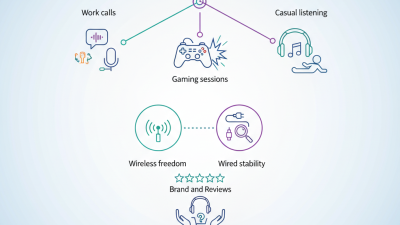
The best choice depends on your routine. Office workers may need dependable multipoint switching, while travelers may value strong noise control and a compact case. Gamers should check latency and platform support. People with glasses may notice pressure around the ear after several hours. These are not minor concerns. They affect daily satisfaction.

No single model wins every category. Some headphones offer excellent microphones but weak bass. Others sound impressive yet become uncomfortable quickly. This guide will point out those trade-offs clearly, including areas where the evidence remains limited or imperfect. Before buying, confirm current firmware support, warranty terms, and return policies. A careful decision usually begins with your actual habits, not a popular product ranking.

How to Choose Wireless Headphones With Microphone 2026?

What to Consider Before Choosing Wireless Headphones With a Microphone

Choosing wireless headphones with a microphone in 2026 starts with your real speaking environment. A quiet bedroom is easy; a windy street is not. Look for microphone tests recorded outdoors, not only laboratory claims. Clear voice pickup should preserve consonants while reducing keyboard clicks and traffic rumble. Active noise cancellation helps you hear others, but it does not guarantee that others hear you clearly. Check whether the microphone uses beamforming or software noise reduction. Ask how it performs during video calls, gaming, and short phone conversations.

Comfort deserves practical testing. Wear the headphones for thirty minutes, then notice heat, pressure, and slipping. Lightweight designs may feel better, yet smaller ear cups can weaken bass and block less noise.

Check battery life with the microphone active, because advertised playback time often uses ideal settings. Multipoint connection is useful when moving between a laptop and phone, but switching can occasionally fail. Wireless latency matters for games and editing.

Verify supported codecs, app permissions, and operating-system compatibility before paying. I once ignored call controls and regretted it during a busy commute. That was my mistake.

Tips: Record a ten-second voice memo outside. Replay it beside steady traffic. Test the mute button, charging cable, and Bluetooth reconnection. Read independent measurements, but treat them as guidance, not proof. No checklist is perfect. Keep the recording for comparison.

How to Compare Microphone Quality and Voice Clarity

How to Choose Wireless Headphones With Microphone 2026?

Microphone quality deserves more attention than bass or battery life. The Bluetooth SIG’s 2024 Market Update projected 5.4 billion Bluetooth device shipments that year. More wireless calls mean more noisy, inconsistent conversations. Compare microphones by recording the same sentence in a quiet room, beside traffic, and near moving air. Listen for sharp consonants, especially “p,” “t,” and “k.” Muffled words usually indicate weak microphone tuning or aggressive noise suppression. Silence is not always clarity.

The ITU-T P.800 framework measures perceived speech quality with a 1-to-5 Mean Opinion Score. Use that idea at home, even without laboratory equipment. Ask another person to rate your recording, then check missed words during transcription. A microphone that sounds warm may still hide sentence endings. Test both sides of a conversation. Many headsets perform well in quiet rooms but lose detail around keyboards or cafés. That result matters more than a perfect product specification.

Check microphone direction, wind handling, and sidetone control. A close microphone often captures speech more clearly, but it may emphasize breathing. Digital noise reduction can remove traffic, yet sometimes damages natural voices. This trade-off is easy to overlook. In practical comparisons, repeat each test several times because one recording can mislead you. I would not trust a single online score. Room shape, speaking distance, and even the listener’s hearing can change the result.

Which Wireless Features Affect Compatibility and Convenience

How to Choose Wireless Headphones With Microphone 2026?

Wireless headphones are convenient, but compatibility depends on more than Bluetooth pairing. Check whether your phone, computer, or tablet supports the same Bluetooth profiles. Hands-free calling usually requires HFP support, while high-quality audio may use A2DP. Newer Bluetooth versions can improve stability, but they do not guarantee better sound. I always test the microphone in a quiet room and near a busy street. Real conditions reveal weaknesses.

Multipoint connection lets headphones switch between two devices, such as a laptop and phone. This feature saves time, but switching can fail during active calls or video meetings. A USB wireless receiver may provide lower delay for gaming and computer calls. However, it can occupy a valuable port and may need a separate adapter. Check operating-system support before buying. Small details matter.

Microphone quality also changes with wireless mode. Some models reduce audio quality when the microphone is active. That limitation can make music sound flat during meetings. Battery life, charging speed, physical controls, and connection range affect daily convenience. I prefer clear buttons over delicate touch controls, especially outdoors. Still, my preference is not universal. Try the headphones with your main devices, because specifications rarely describe every interruption, delay, or awkward connection.

How to Choose Wireless Headphones With Microphone in 2026?

Which Wireless Features Affect Compatibility and Convenience?

Bluetooth multipoint, microphone profiles, USB-C audio, low-latency modes, and modern Bluetooth codecs can significantly affect everyday use. The scores below are practical comparison scores from 1 to 10, based on the number of supported connection scenarios, setup simplicity, and usefulness across phones, tablets, computers, televisions, and game consoles.

Bluetooth Classic audio commonly uses A2DP for playback and HFP for calls. Multipoint improves convenience but may not work with every device combination. USB-C audio and a 3.5 mm backup connection can improve compatibility when Bluetooth pairing is unavailable.

How to Evaluate Comfort, Battery Life, and Durability

How to Choose Wireless Headphones With Microphone 2026?

Comfort, battery life, and durability matter more than impressive feature lists. Wear the headphones for at least 60 minutes before buying. Notice pressure around your ears and heat beneath the cushions. If you wear glasses, check whether the headband increases side pressure. A stable fit should not require constant adjustment. Small discomfort becomes obvious during long meetings. I learned this after ignoring a tight clamp.

Battery claims need careful interpretation. Manufacturers usually measure playback at a specific volume and feature setting. Real use may include calls, noise cancellation, and frequent reconnection. Test battery performance at your normal volume for several days. A practical target is enough power for a workday, plus charging time you can manage. Fast charging helps, but it cannot repair a weak battery. Check whether the battery can be replaced.

Durability begins with physical inspection. Flex the headband gently, examine the hinges, and inspect the charging port. Avoid forcing anything. Look for clear resistance to twisting, not unnecessary stiffness. Water resistance ratings can protect against sweat, but they do not always permit full immersion. Read the stated rating and warranty conditions. My testing is not perfect; temperature, storage, and handling change results. Still, repeated checks reveal weaknesses that a short shop visit may hide. Microphone quality also deserves a quiet-room and outdoor test. Wind can expose poor design quickly.

How to Match Headphone Types to Your Main Use Case

How to Choose Wireless Headphones With Microphone in 2026?

Your main activity should guide the headphone type, not flashy specifications. For commuting, choose closed-back over-ear headphones with active noise cancellation and soft, stable padding. They reduce train noise and keep voices clearer during calls. Canalys reported that global true wireless stereo shipments reached about 78 million units in Q3 2024, growing 6% year over year. This growth shows strong demand for compact listening, but small earbuds may feel tiring after several hours.

For office calls, prioritize microphone quality, multipoint connection, and sidetone control. A good microphone should capture your voice near a busy keyboard without sounding hollow. For exercise, secure-fitting earbuds with an IP rating are more practical than heavy over-ear models. For gaming, low-latency wireless performance matters more than maximum bass. Check compatibility with your console, computer, and phone before buying. I have found that advertised battery life often exceeds real use, especially with noise cancellation enabled. That difference deserves attention.

Tips: Test the microphone in a quiet room and beside traffic noise. Record three sentences. Listen for breath sounds, keyboard clicks, and sudden volume changes. Keep the headset on for thirty minutes before deciding. Comfort is personal, and one fitting chart cannot predict every ear shape. Also, do not trust one review alone. Compare independent measurements with long-term user reports, such as those discussed in RTINGS testing and Consumer Reports guidance.

Our offices

Axtel Poland (HQ)
Mokotów Box 16 Woloska St
02-675 Warsaw Poland

tel. (+48 22) 490 96 00
fax: (+48 22) 540 15 22
sale@officeveigl.com

Axtel Middle East & Asia
G-026, THUB 2
Dubai Silicon Oasis
Dubai United Arab Emirates

tel. +971 50 5540 902
sale@officeveigl.com

Axtel India Private Limited
Unit # S-2, Srinivasa Apartments,
16, 1st Cross, Doctors Layout, Kasturinagar,
Bengaluru, Karnataka, India

tel. +91 96865 46376
sale@officeveigl.com

Axtel Benelux
Microlab Kastanjelaan 400
5616 LZ Eindhoven The Netherlands

+31 629 796 453
sale@officeveigl.com


